Shrimp PL Counter & Post-Larvae
Counting shrimp post-larvae (PL) is one of the most important steps when preparing seed for stocking. Hatcheries and shrimp farmers need a practical way to estimate the number of PLs in a sample without relying entirely on slow manual counting.
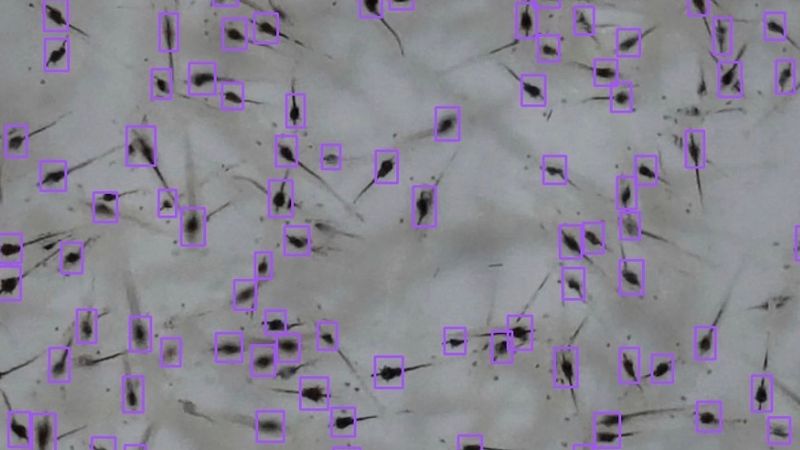
Aquanubandh PL Counter is a free web-based tool that uses AI-based image analysis to identify and count shrimp post-larvae from an uploaded image. No account or payment is required to try the tool.
To try it our visit plcounter.aquanubandh.com
What is a shrimp PL counter?
A shrimp PL counter is a tool designed to estimate or count post-larvae (PL) in a sample of shrimp.
In shrimp hatchery and farming operations, post-larvae counting is used to help determine the quantity of seed available for sale, transportation, stocking, or further production management.
Traditionally, PL counting can involve manual sampling and visual counting. This becomes increasingly difficult when there are many small shrimp in a sample, particularly when individuals overlap or move during observation.
A digital PL counter uses image analysis to assist with this process.
Aquanubandh PL Counter
Aquanubandh PL Counter was built specifically around a simple idea:
Take a clear image of your shrimp PL sample, upload it, and get a count.
The tool is designed for people searching for solutions such as:
- shrimp PL counter
- post-larvae counter
- shrimp larvae counting app
- post-larvae counting app
- shrimp post-larvae tracking app
- PL counting software
- AI shrimp counter
- shrimp hatchery counting app
- shrimp seed counting tool
This has been made possible by Roboflow's workflow and this system uses artificial intelligence to identify and count the Post Larvae
How the Aquanubandh PL counter works
1. Prepare a clear PL sample
Place the shrimp post-larvae in a suitable container or counting area where the shrimp can be seen clearly.
Good lighting and a suitable background can make image-based detection easier.
2. Capture or select an image
Use your phone or computer to select a photograph of the PL sample.
The image should contain the shrimp clearly and avoid unnecessary objects, reflections, extreme blur, or obstructions.
3. Upload the image
Upload the photograph to the Aquanubandh PL Counter.
The image is processed using AI-based computer vision to identify shrimp in the sample.
4. View the PL count
The system produces a PL count from the uploaded image.
The result can then be used as an additional reference when checking shrimp seed quantities.
How to get better results from a shrimp PL image
For image-based counting, the quality of the input image matters.
Use a well-lit sample with the shrimp visible against an appropriate background. Avoid strong glare, heavy reflections, excessive motion blur, and images where a large portion of the sample is obstructed.
Very dense samples can also create additional challenges because shrimp may overlap one another.
This is not unique to one application. Scientific research on automated shrimp counting specifically identifies overlapping shrimp, background noise, tiny object size, and high-density samples as challenges for computer-vision models.
Why digital PL counting matters in shrimp farming
Post-larvae are the starting point of the production cycle.
The number of shrimp stocked affects how later farm data is interpreted. Stocking numbers are relevant when assessing survival, biomass, growth, and production performance.
For that reason, better digital records at the seed stage can contribute to better data later in the production cycle.
Aquaculture is increasingly using computer vision and AI for tasks that previously depended heavily on manual observation. Recent research continues to investigate automated shrimp counting and edge/mobile computer-vision systems for hatchery environments.
Frequently asked questions
What is a shrimp PL counter?
1) What does PL mean in shrimp farming?
PL means post-larvae. The term is commonly used to describe young shrimp after the larval stages.
2) Is Aquanubandh PL Counter free?
The Aquanubandh PL Counter is currently offered as a free web-based tool without requiring signup.
3) Do I need special hardware?
The Aquanubandh PL Counter is designed to work from an uploaded image, so a compatible phone or camera for capturing the image is sufficient for the basic workflow.
4) Can I use a phone camera?
Yes. A phone can be used to capture the image before uploading it to the PL Counter.